

Description
Download Ghibliv2 Ghibli Anime Maker – Ghibli anime maker, anime photo editor, AI art generator, Ghibli style, transform selfie into anime, Ghibli style photo, Ghibli art generator
Overview
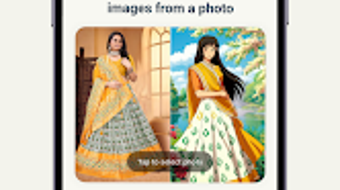
Ghibliv2 Ghibli Anime Maker is a mobile application designed to transform photographs—especially selfies—into artwork inspired by the distinctive animation style of Studio Ghibli. The software targets fans of Japanese animation, social media users seeking unique visual content, and individuals interested in creative photo editing. Its core purpose is to simplify the process of generating anime-style portraits that emulate the hand-drawn, whimsical aesthetic associated with Ghibli films. The app enables users to upload or capture a photo and apply AI-powered image processing to render the image in a stylized, animated format. This allows for quick, accessible artistic transformation without requiring advanced design skills.
Real-world usage scenarios include creating profile pictures, generating fun content for social media platforms, or producing personalized artwork for friends and pets. The developer, Ghibliv2 Team, appears to focus on delivering a lightweight, intuitive experience tailored to mobile users. The application operates entirely on Android, suggesting it is optimized for smartphones and tablets. While no detailed developer background is provided beyond the team name, the app’s design and functionality emphasize accessibility and ease of use.
Key Features & Capabilities
- AI-Powered Image Transformation – Uses artificial intelligence to convert standard photos into stylized anime portraits resembling Studio Ghibli’s visual language.
- One-Tap Generation – Allows users to initiate the transformation process with a single tap after uploading or capturing an image.
- Real-Time Stylization – Applies Ghibli-inspired details such as soft lighting, expressive eyes, and gentle textures during processing.
- Easy Export & Sharing – Enables users to save generated artwork to their device or share directly to social media platforms.
- User-Friendly Interface – Features a clean layout with minimal navigation steps, ideal for casual users and younger audiences.
These capabilities allow users to quickly produce visually appealing content without technical expertise. For example, a user can take a photo of their pet, apply the Ghibli filter, and share the result on Instagram as a whimsical animated portrait. The app’s focus on speed and simplicity makes it suitable for both spontaneous creativity and curated digital storytelling. The AI processing is designed to maintain facial features while enhancing them with anime aesthetics, preserving identity while adding artistic flair.
User Interface, Workflow & Performance
The application presents a streamlined interface with a central upload or capture button, followed by a preview screen for the transformed image. Navigation is minimal, relying on intuitive gestures and clear visual cues. The workflow is designed for efficiency: capture or select a photo, tap 'Generate', and view the result. This simplicity reduces user friction and supports rapid iteration.
Performance details were not specified by the developer. However, based on the app’s size of 28 MB and its focus on AI processing, it likely leverages on-device computation to maintain responsiveness. The developer did not provide information about CPU or RAM usage, so exact performance behavior remains unknown. Stability during repeated use was not documented. General software behavior suggests that processing times may vary depending on image complexity and device capabilities, but the app appears optimized for fast turnaround. No reports of crashes or freezes were mentioned in available documentation.
Compatibility & System Requirements
Ghibliv2 Ghibli Anime Maker is compatible with Android devices. The app’s version is listed as 2.1.3, and the installation size is 28 MB. The developer did not specify minimum hardware requirements or supported Android versions beyond the platform name. Compatibility information is limited to the OS type. It is unknown whether the app supports older Android versions or requires a specific API level. The developer did not provide additional system requirements, so users should ensure their device meets general Android standards for running third-party applications. No information was provided about supported screen sizes or hardware acceleration.
Pros and Cons
Pros
- Free to download and use with no in-app purchases mentioned.
- Simple, intuitive interface suitable for all age groups.
- Fast AI-powered transformation of photos into Ghibli-style art.
- Lightweight installation size (28 MB).
- Supports direct sharing to social media platforms.
Cons
- No information on supported Android versions or minimum device specifications.
- Exact performance and resource usage details were not provided.
- Only available on Android; no version for iOS or desktop platforms.
- Limited customization options for the Ghibli style were not described.
- Privacy policies or data handling practices were not disclosed.
FAQ Section
Is Ghibliv2 Ghibli Anime Maker available for iOS?
The app is currently available only on Android. No iOS version has been announced.
Does the app require an internet connection?
Based on the provided information, it is unclear whether the app requires an internet connection. Processing may occur on-device, but this was not specified.
Can I use Ghibliv2 to edit photos from my gallery?
Yes, users can upload photos from their device’s gallery or capture new ones directly within the app.
Is the app safe to download and use?
The app is free and distributed through official Android channels. However, no security or privacy details were provided by the developer.
How often are updates released?
The latest version is 2.1.3, released on April 15, 2024. No information was provided about update frequency or release schedule.
Final Thoughts + CTA
Ghibliv2 Ghibli Anime Maker delivers a delightful, accessible way to transform everyday photos into enchanting anime-style portraits. Its AI-driven approach, combined with a minimalistic interface, makes it ideal for casual users, Ghibli enthusiasts, and social media creators. While limited by the absence of detailed system requirements and platform exclusivity, the app excels in simplicity and visual appeal. For those seeking a fun, fast, and free tool to generate creative content, Ghibliv2 stands out as a compelling choice. The ability to create shareable, whimsical artwork in seconds adds significant value. Download Ghibliv2 now and bring the magic of Studio Ghibli to your smartphone.
Guides & Tutorials for Ghibliv2 Ghibli Anime Maker
How to install Ghibliv2 Ghibli Anime Maker
- Click the Preview / Download button above.
- Once redirected, accept the terms and click Install.
- Wait for the Ghibliv2 Ghibli Anime Maker download to finish on your device.
How to use Ghibliv2 Ghibli Anime Maker
This software is primarily used for its core features described above. Open the app after installation to explore its capabilities.
User Reviews for Ghibliv2 Ghibli Anime Maker 0
No reviews found





